Native macOS app

Your AI-agent rule library, synced both ways.

Keystone keeps reusable rules and Skills in profiles, writes the right files into each project, and turns outside edits into a review queue before they become shared truth.

Native macOS 14+ · Local-first · Free to download

Review Promote Sync
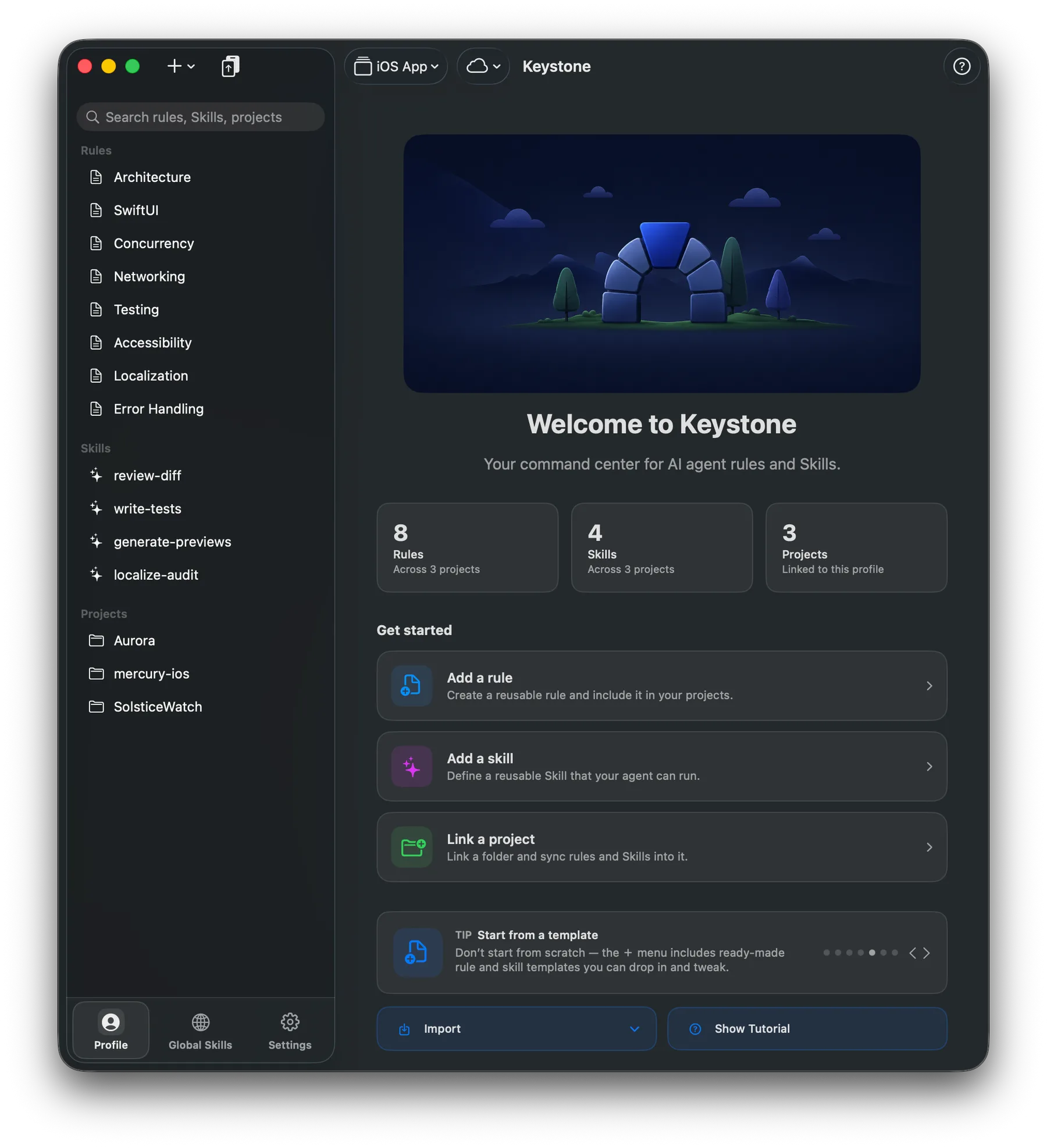
Keystone dashboard showing the iOS App profile, reusable rules, Skills, linked projects, and getting-started actions.

One library

Reusable rules and Skills live in a profile — not scattered across one-off markdown files.

Linked, not copied

Projects stay connected. Each one gets the agent files it needs, in the format each tool expects.

Profiles, not piles

Switch between iOS, web, client, or personal setups without rewriting everything.

Materializes each agent's format

AGENTS.md CLAUDE.md .cursor/rules copilot-instructions.md .windsurf/rules GEMINI.md .agents/skills

Claude Code, Cursor, Copilot, Windsurf, Gemini CLI, Codex — plus any tool that reads the open AGENTS.md standard.

Compare tool outputs

One profile, different files for each agent.

Keystone does not just copy the same text everywhere. It keeps AGENTS.md as the canonical project file, then writes mirrors, imports, generated copies, or rule directories where each tool expects them.

Canonical

AGENTS.md stays the readable source each project can keep even if you stop using Keystone.

Tool-native

Cursor, Copilot, Windsurf, Claude, Gemini, and Codex each get the path they actually read.

Claude

CLAUDE.md

Symlink or @AGENTS.md import file.

Gemini

GEMINI.md

Symlink or @AGENTS.md import file.

Cursor

.cursor/rules/*.mdc

Generated rule files with Cursor-friendly frontmatter.

Copilot

.github/copilot-instructions.md

A generated copy in the path GitHub expects.

Windsurf

.windsurf/rules/*.md

Directory-style rules instead of one giant file.

Codex

AGENTS.md

Reads the canonical project instructions directly.


Why it is not just another editor

Built for the messy part competitors leave to you.

Agent instructions are easy to create. They are harder to keep current across projects, machines, and tools after real work starts changing them.

Free CLI sync

Great for one-way export

  • Usually strongest when rules live in one repo or config file.
  • Good for automation, less good for visual conflict review.
  • Project edits can become drift unless you manually reconcile them.
Keystone

A project-connected library

  • Profiles give each project a deliberate rule and Skill set.
  • Three-way review separates additions, edits, removals, and conflicts.
  • Accepted project changes flow back into the profile, then out everywhere.
Prompt editors

Great for writing, not wiring

  • Helpful for authoring reusable prompts and instructions.
  • Often not centered on per-repository file materialization.
  • Less explicit about what changes when an agent edits project files.

What makes Keystone different

An AI-agent rule library that keeps itself alive.

Most sync tools export files once. Keystone stays connected to your projects: it writes the right files, watches for outside edits, and keeps your profile as the source that evolves.

Bidirectional pull-back

Edit a project file outside Keystone, review the detected change, then pull it into the profile and propagate it everywhere else.

Project materialization

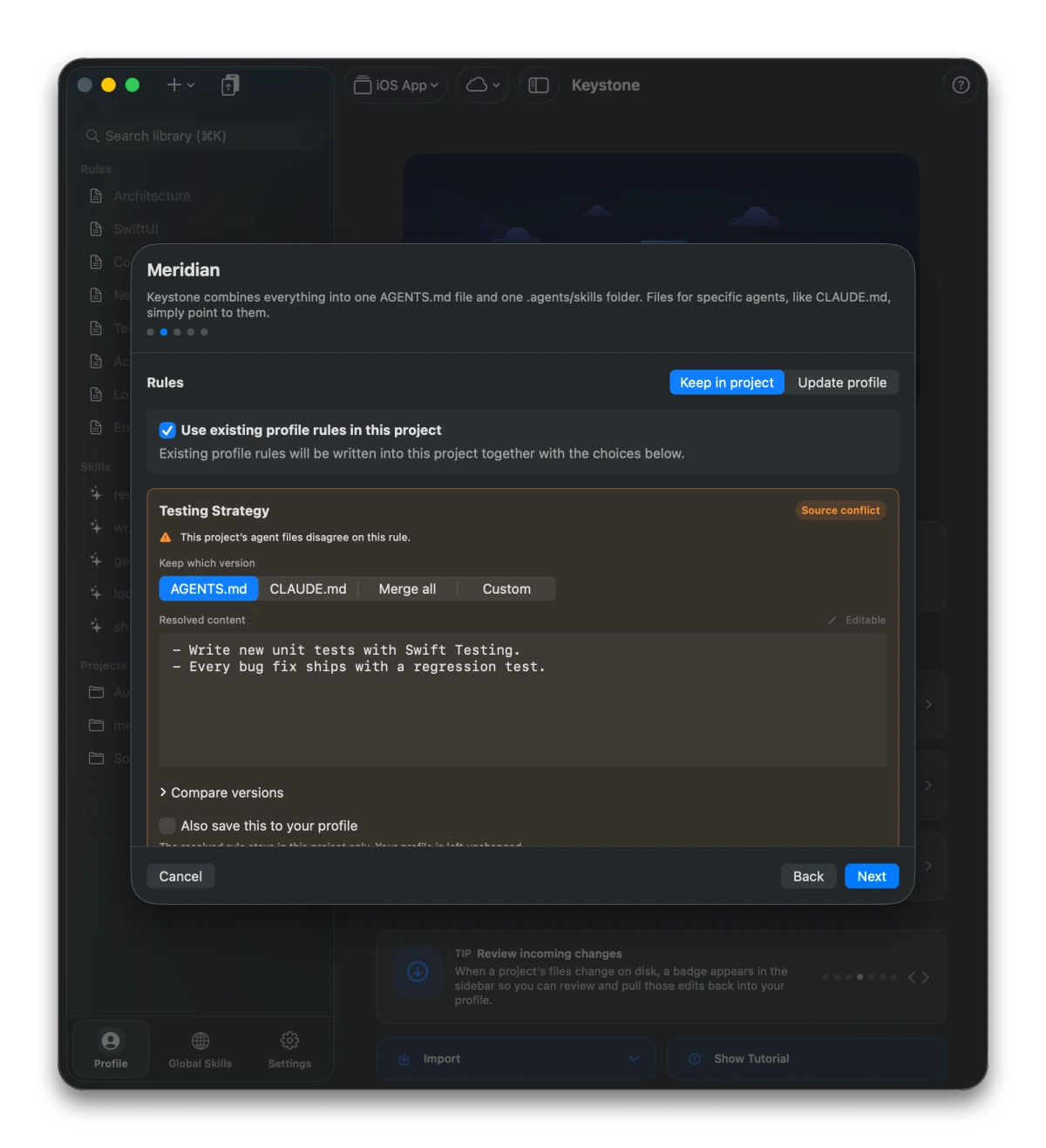
Link a folder and choose which agents it should support. Keystone writes AGENTS.md, symlinks, generated rule files, and Skill folders.

Switchable profiles

Keep separate libraries for iOS, web, work, personal, or clients. Each linked project belongs to exactly one profile.

iCloud profile sync

Profiles sync across your Macs with no Keystone account. Linked project folders stay local to each device.

Global Skills

Manage Skills once in your home directory and mirror them to Skills-capable agents, available across every project.

Non-destructive

Sandboxed and careful with existing files. Keystone adopts what it can, preserves unmanaged content, and never silently clobbers your work.

Import what you have

Link a project and Keystone offers to import its existing AGENTS.md or CLAUDE.md into your library. Migration is one click, not an afternoon.

Undo, even after accept

Accepted a project change into your profile and regret it? One click restores the previous state — the review flow is never a one-way door.

No lock-in

Everything Keystone writes is plain markdown in your repo. Export a profile as a standalone AGENTS.md, copy it, or share it — delete the app and your files still work.

Local-first by default: Keystone works with folders you explicitly link, stores profiles on your Mac, uses your private iCloud when sync is enabled, and does not require a Keystone account.


Bidirectional sync

Project edits are not lost, they are promoted.

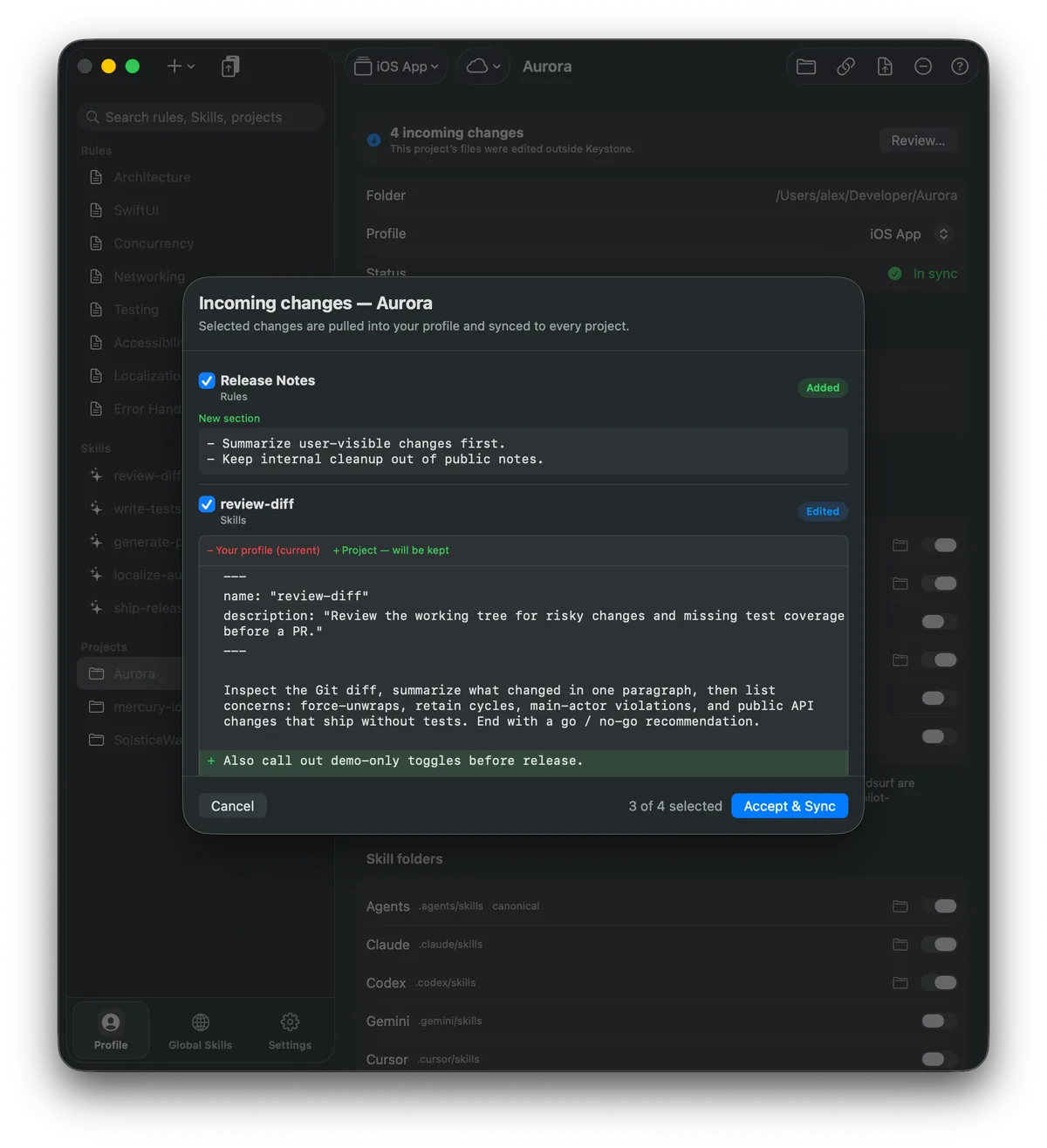
When a rule or Skill changes outside Keystone, the project shows an incoming-change badge. Open the review sheet, compare the project version with the profile version, choose what to keep, then accept and sync.

Keystone incoming changes review showing added and edited project changes selected for Accept and Sync.

Added and edited changes become a review queue

Keystone classifies new sections, edited rules, changed Skills, and removals so you can pull only the useful edits into the profile.

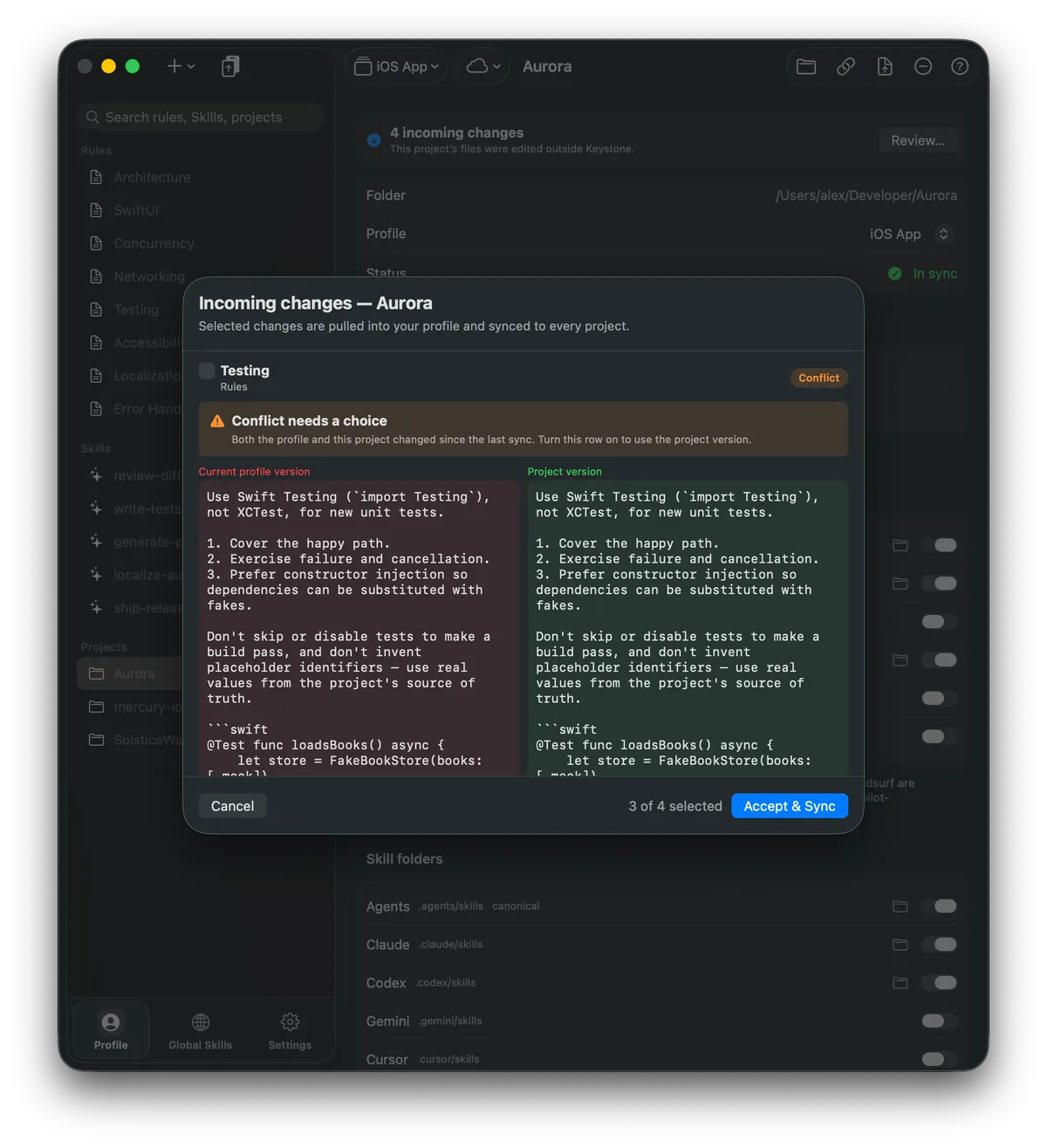
Keystone conflict review comparing the current profile version and the project version side by side.

Conflicts get a side-by-side choice

If both the profile and project changed since the last sync, Keystone shows both versions instead of guessing. Pick the project version when it should become the new shared truth.

Detect

Keystone watches linked files for edits made by you, an agent, or another editor.

Compare

A three-way diff separates added, edited, removed, and conflicting changes.

Promote

Accepted changes update the profile, then Keystone syncs them back to every linked project.


How you use it

Build the library once, then link projects.

Keystone is not asking you to hand-edit six tool-specific files. You work in profiles, add reusable rules and Skills, then let Keystone materialize the right files per project.

1

Pick a profile

Use iOS, web, personal, or client profiles so each project gets the right rule set.

2

Add rules and Skills

Start from templates, import existing markdown, or paste a Skill link.

3

Link a folder

Choose which agents the project uses; Keystone writes only those targets.

4

Sync both ways

Push profile updates out, and pull useful project edits back into the shared library.

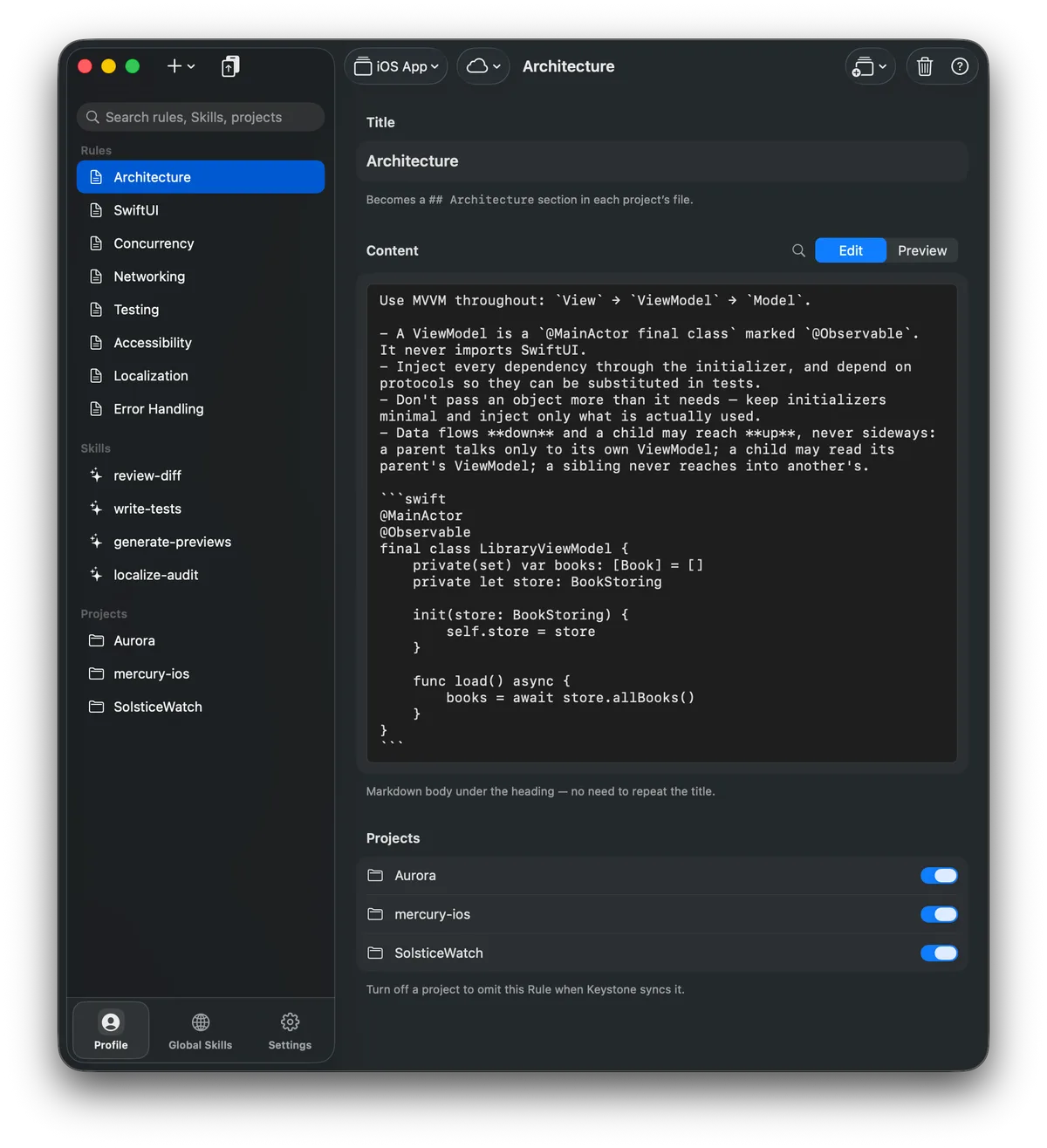
Keystone rule editor with an Architecture rule, markdown content, and per-project inclusion toggles.

Edit the canonical rule

Rules are named markdown sections. Toggle which linked projects receive each one, then push the profile when you are ready.

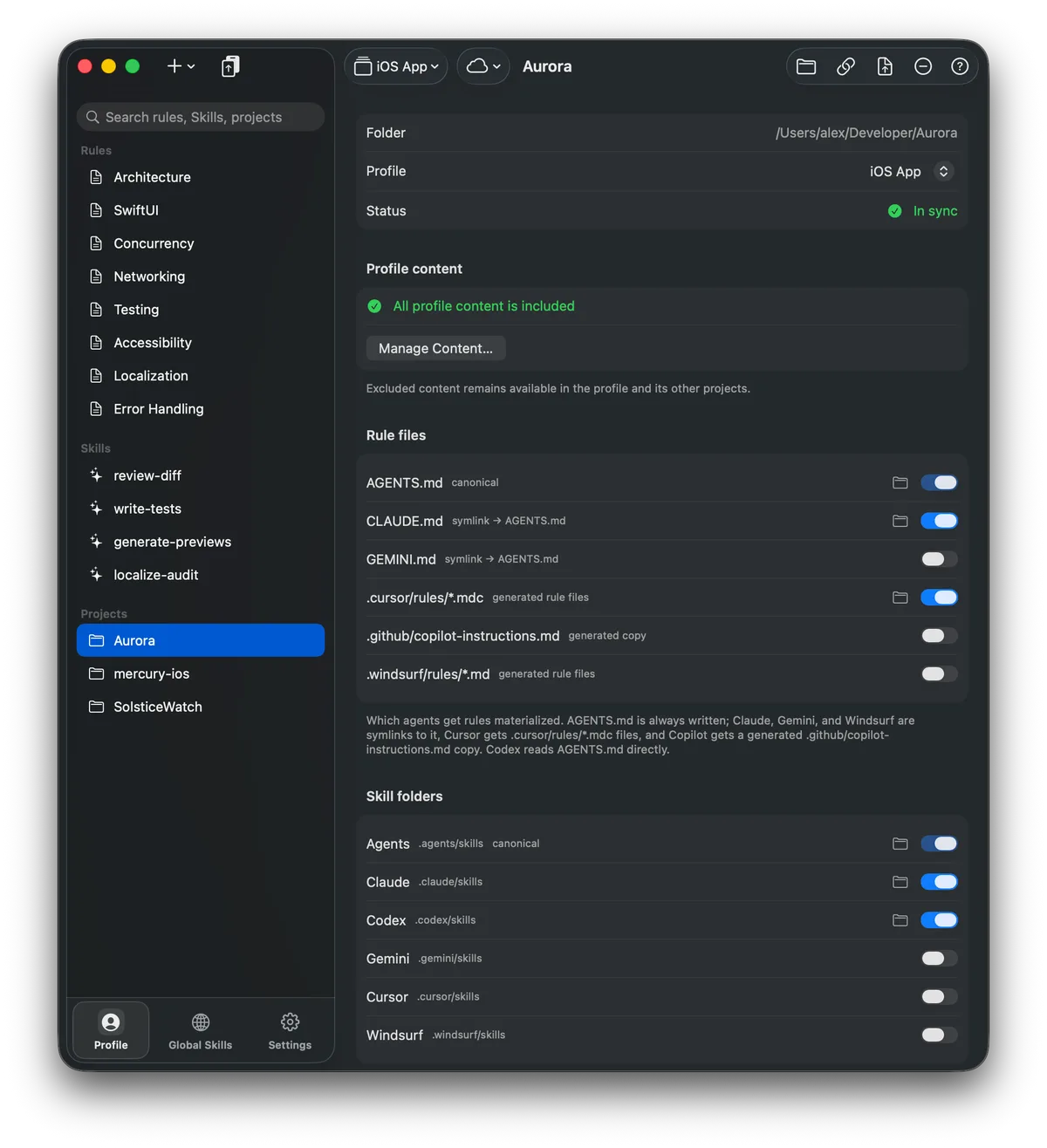
Keystone project detail screen showing an in-sync Aurora project and enabled rule and Skill targets.

Choose the files per project

Turn agent targets on or off project by project: canonical AGENTS.md, symlinks, generated rule files, and Skill folders.


Rare features, visible

Profiles, iCloud, and Skills are first-class.

These are the parts that make Keystone more than a markdown editor: separate libraries for different work, cloud-synced profiles, and reusable Skills that can be global or project-scoped.

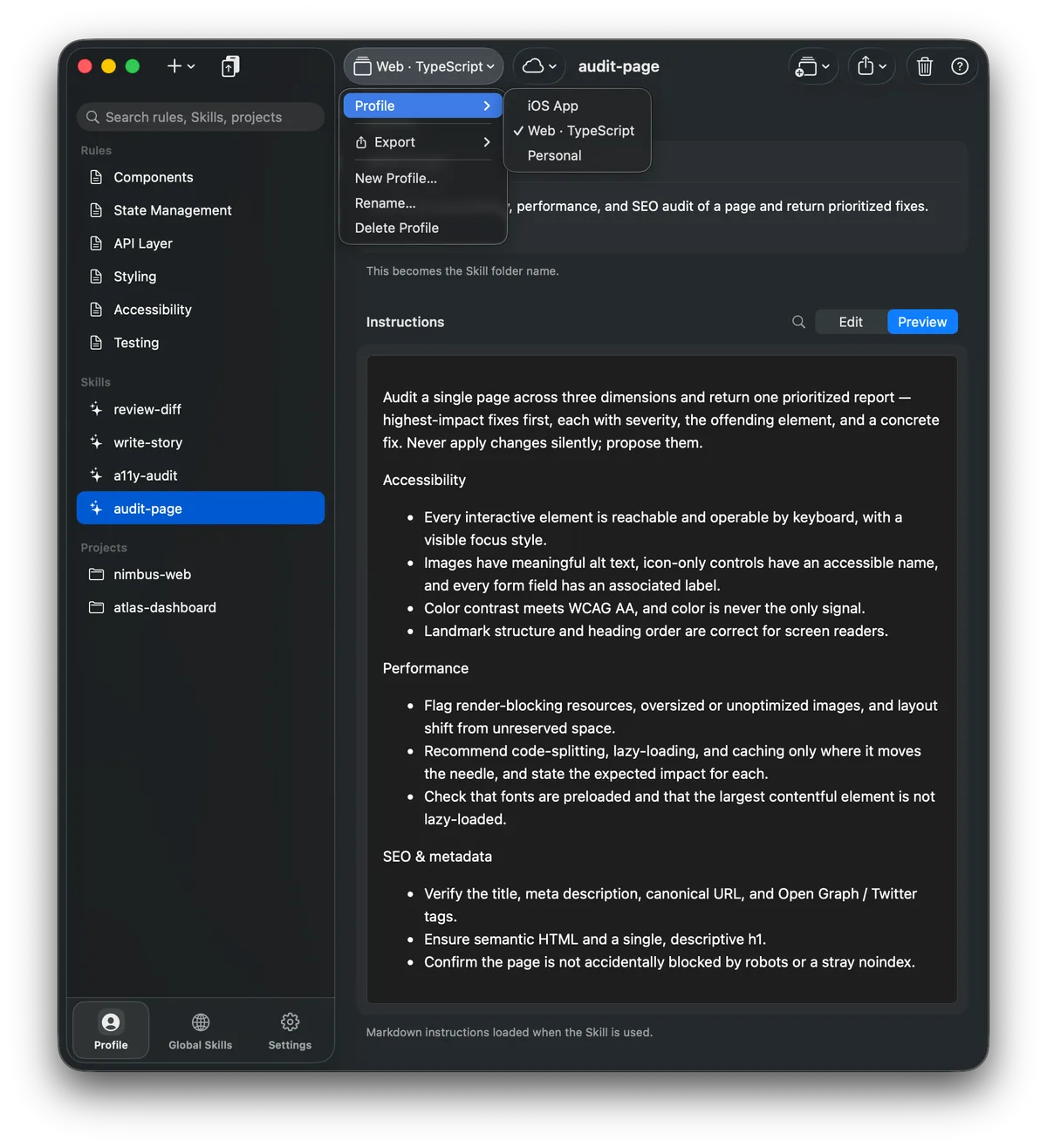
Keystone profile switcher showing iOS App, Web TypeScript, and Personal profiles.

Switch the whole library

Profiles keep rules, Skills, and linked projects separate. Use a tight iOS profile for native apps, a web profile for TypeScript, and a personal profile for everything else.

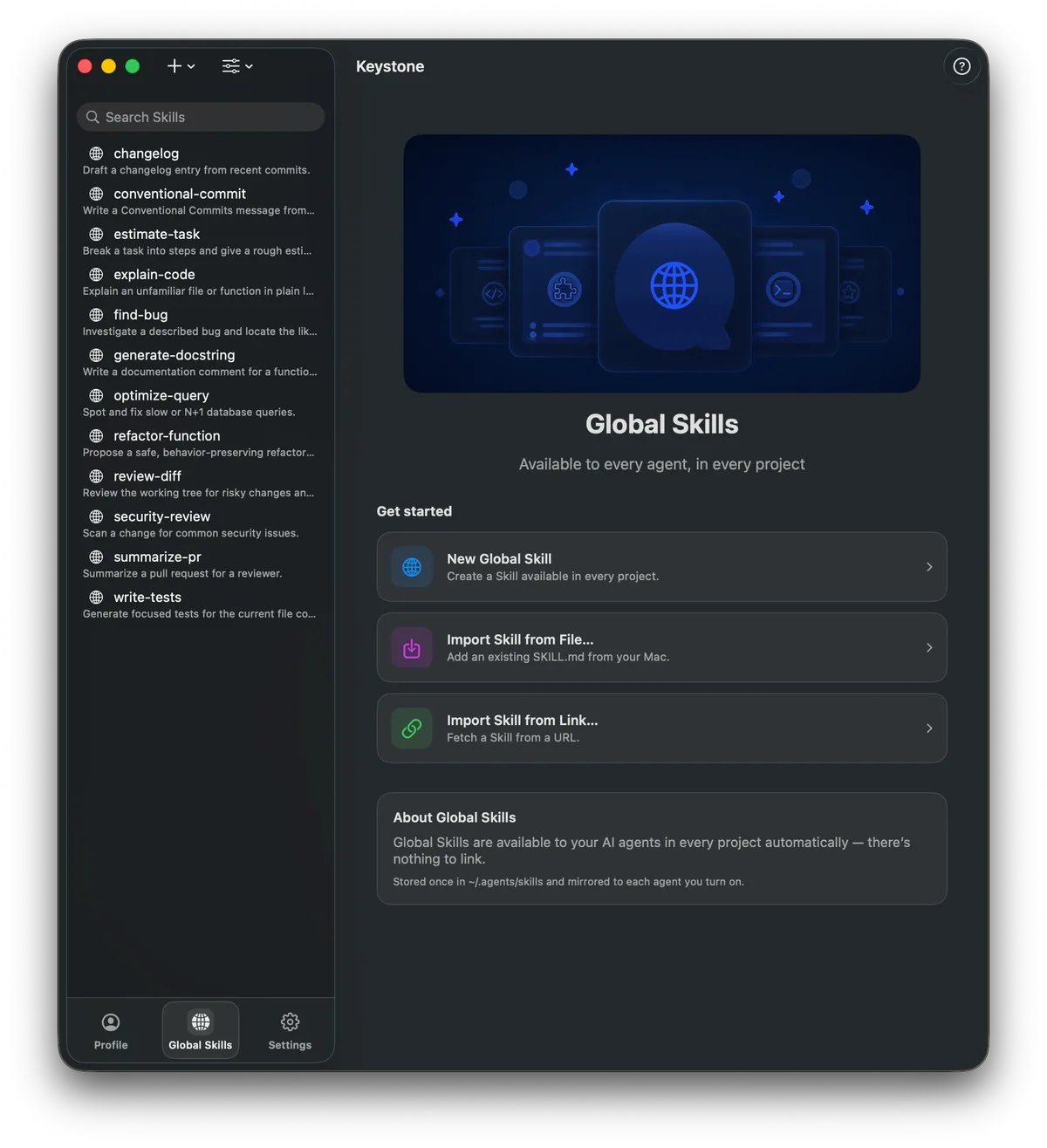
Keystone Global Skills tab listing reusable Skills available in every project.

Keep global playbooks everywhere

Global Skills live once in your home directory and are mirrored to each supported agent, so commands like review-diff and write-tests follow every project.


Simple, honest pricing

Free to download from the Mac App Store. Unlock Pro when Keystone becomes the rule library for all your projects — a one-time lifetime purchase is available.

Free

Everything you need to try Keystone on a project or two.

  • Up to 1 profile and 2 linked projects
  • All agent formats and Skills
  • Symlink or import link styles
Pro

Keystone Pro

For managing your rules across everything you build.

  • Unlimited profiles and projects
  • iCloud sync across all your Macs
  • One-time lifetime unlock available
Download on the Mac App Store

Questions

Before you link your first repo

Will Keystone overwrite my existing AGENTS.md or CLAUDE.md?

No. When you link a folder, Keystone offers to import the rules it finds into your library first. It never replaces a real file it didn't create — if a conflicting file exists, Keystone leaves it alone and tells you.

What ends up in my repository?

Plain files, exactly where each tool expects them: a readable AGENTS.md, symlinks or import stubs for Claude and Gemini, generated rule files for Cursor, Copilot, and Windsurf, and Skill folders. No hidden metadata, no proprietary format. Commit them like any other file.

What happens if I stop using Keystone?

Nothing breaks. Every project keeps its working AGENTS.md and tool files. You can also export any profile as a standalone markdown file at any time.

What if an agent or teammate edits the files directly?

That's the point of Keystone. It detects outside edits, classifies them with a three-way diff — added, edited, removed, or conflicting — and queues them for review. You choose what gets promoted into the shared library, and you can undo an accepted change afterward.

Do I need an account?

No. Keystone has no account system and no telemetry-driven backend. Profiles are stored on your Mac; optional sync across your Macs uses your private iCloud.

What's free and what's Pro?

Free includes one profile, two linked projects, every agent format, and Skills. Pro removes the limits and adds iCloud sync across Macs — with a one-time lifetime unlock if you dislike subscriptions.


Keystone

Give your agents a library that stays current.

Built for macOS 14 and later. Free to download — link your first project in under a minute.

Download on the Mac App Store